![Grip-Vertical-Logo-Purple-1.png]](https://support.grip.events/hs-fs/hubfs/Grip-Vertical-Logo-Purple-1.png?width=23&height=34&name=Grip-Vertical-Logo-Purple-1.png)
Your attendee list is the most valuable data in your event, and the people most likely to scrape it are other registered participants. Grip treats this as a permanent part of running the platform rather than a one-off fix. This page explains, in plain terms, the protection that is in place, what you can see, and what you can do about it.
- What is data scraping?
- Grip’s protection
- What a banned participant experiences
- What you can see
- How you can take action on Bans
- What can I do to minimise scraping of my event?
- What Grip does not do
- Policies & legal action associated with data scraping
What is data scraping?
Data scraping is a technique where a computer program extracts information from another program's output. Web scraping is a common form of data scraping, where an application gathers valuable data from a website. People often scrape websites to reuse content, create alternative interfaces, or for research purposes. This is a challenge faced by all web applications.
How is it done?
Data scraping can be done manually or automatically and utilizes various methods:
- Spiders: These programs follow links on websites to gather specific data.
- Shell Scripts: Basic scripts using Unix tools to download and extract data.
- HTML Scrapers: Extract data based on HTML patterns.
- Screen Scrapers: Use real browsers to extract data from web pages.
- Web Scraping Services: Professional scraping services often employ proxies to overcome restrictions.
- Embedding and Mobile Apps: Websites can be embedded in other pages or mobile apps.
- AI Agents: Participants use an AI browser plugin or program to automate actions on their behalf, and also try to extract information that's not intended to be visible.
- Copy-and-Paste: People manually copy and paste content for various purposes.
Grip’s protection
Grip aims to prevent data scraping by existing behind a log in, limiting abusive usage, and constantly changing its environment to deter automated scraping. The event industry poses some unique challenges due the significant peak and troughs in usage and the release of attendee lists to registered users, which can include data scrapers.
Eight layers, not one wall
Every request to Grip passes through a series of independent checks including rate limits, behaviour guards, perimeter firewalls and fingerprinting. A scraper has to get past all of them but a genuine attendee never notices any of them.
The thresholds behind these layers are tuned continuously from live traffic. We do not publish the exact numbers or the exact functionality as this would be counterproductive to stopping the behaviour.
Attendees that continue to exceed the thresholds in place will be automatically banned from the event, temporarily.
What a banned participant experiences
When the platform denies access, the participant is logged out immediately on web and mobile. If they try to log in again, they see:
“Your account has been temporarily locked due to unusual activity. Please try again later or contact the event organizer.”
They are directed to you, not to Grip. That keeps the decision about your participants with you. Automatic bans are lifted after 1 hour, and manual bans (see below) are in place until manually unbanned. You can unban any participant if you believe the ban was applied in error.
What you can see
The Scraping Insights report in Insights shows, for each of your events:
- Participants who triggered scraping alerts, and how often.
- Which protection layer stopped them, and how many requests were refused.
- Participants whose access was banned, when, and whether it was automatic or manual.
Alongside the Insights, your account manager is notified when a participant on your event is banned from the event, and Grip's team reviews scraping alerts daily in a dedicated escalation channel. Ask your account manager for access to the Insights report if you do not have it yet.
How you can take action on Bans
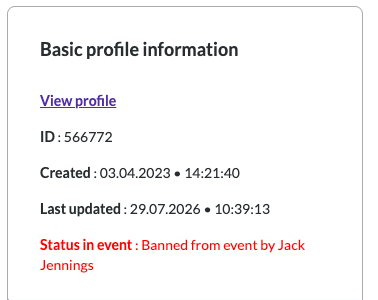
If a ban is in place for a Participant, you will also be able to see this clearly in the Engage Admin Portal, on that Participant's Profile Edit page. Look for their Status in the event, on the right - it will also inform you whether the ban was automatic or done manually by an admin, and who that admin was:
Further down the page, you can Ban/Unban the participant manually:
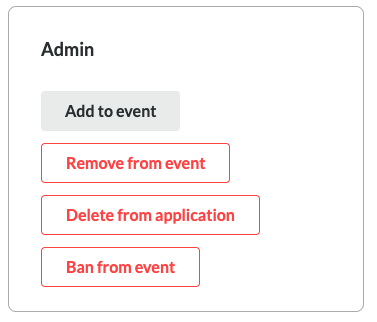
A manual ban stays in place until you lift it.
What can I do to minimise scraping of my event?
Reduce the attack surface. The two configuration choices with the biggest effect:
- Do not publish a full attendee list. Matchmaking and search work without it.
- Do not enable Guest or Anonymous login. Only ticket holders should reach the platform.
- Do not allow participants to share public contact details. We see this being one of the most common reasons for scraping.
Set the rules. Make sure your terms and conditions state that scraping is prohibited and what the consequences are, such as removal from the event. Grip can point you to law firms with experience in this area.
Protect badge scanning. Use randomised alphanumeric scan IDs of at least 10 characters so badges cannot be guessed. When participants scan badges, Contact Details (email/phone) are always shared, so an attacker that automates this process by guessing or just incrementally increasing can be quite dangerous.
Again, the Edit Profile page will warn you of Scan IDs that look like they are a security risk:

What Grip does not do
Grip does not contact your participants about bans, does not decide who should be permanently removed from your event, and does not share one organizer's scraping data with another. Those decisions and that data are yours.
Policies & legal action associated with data scraping
Regardless of whether it is on Grip or on any other platform such as your website, we recommend ensuring your Terms & Conditions and/or “Fair Use Policy” strongly outlines that data scraping is not allowed. It might help to outline the consequences of such activity, (e.g. removal from the event, legal action etc).
We recommend you work with your general counsel and/or an external law firm on this. Grip might be able to recommend a law firm depending on your geography; please ask your account manager for more information.